
SMS received after crossing the border. Internet will be off on the foreign SIM but for accessing the activation page.
in screenshots (1st SMS was end March when I was in Murmansk, but I overlooked it, saw it afterwards, 2nd one was last week-end when in Kaliningrad).
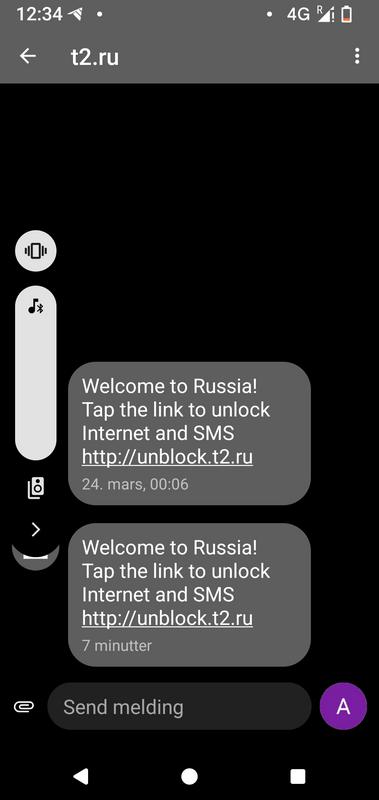
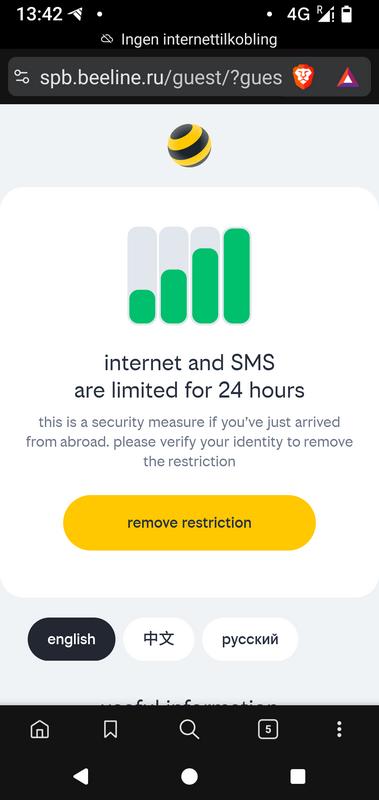
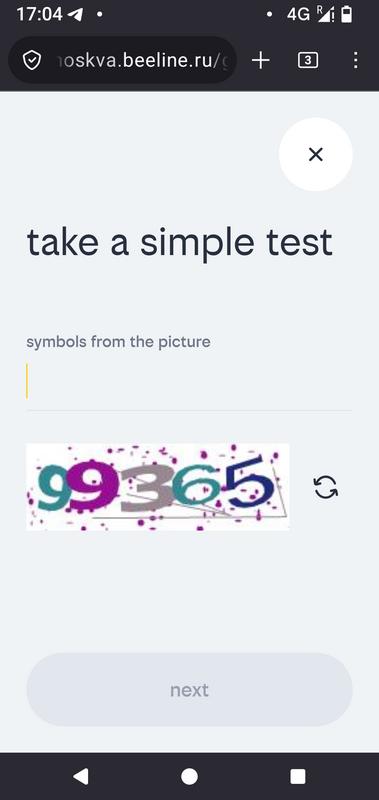
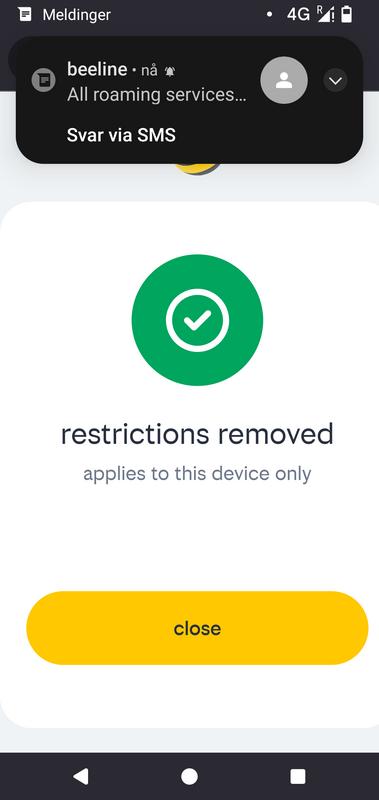
Can you connect to public wifi spots and use data with a foreign sim card?
@Jerz Can you connect to public wifi spots and use data with a foreign sim card?
on wifi mode, the phone uses its wireless module, not the SIM card, so yes you can connect any hotspot, public or with credentials. In wifi mode the phone doesn’t need a SIM, but behaves like any laptop.
but you need a Russian number for public wifi spots no?
@Jerz public wifi spots
wifi spots, either publlic (ie no password) or private (password) are wifi router, ie. nothing to do with SIM cards. A SIM card is not required for connecting a wifi spot.
I have read that you cannot typically connect to public wifi in Russia without a Russian phone number, which is used for verification purposes (receiving an SMS when creating an account). There is a discussion of this here, for example. https://www.reddit.com/r/AskARussian/comments/1p6acds/public_wifi_in_moscow/
@antoniob SMS received after crossing the border. Internet will be off on the foreign SIM but for accessing the activation page.
in screenshots
Are you saying that the 24-hour SMS block does not apply in practice because you can immediately unblock the restictions by clicking on the link the roaming partner sends to you and then typing in the numbers displayed in the “picture”? This is what the screenshots from your recent visit appear to show. Is this very simple unblocking process new?
@Jabod I have read that you cannot typically connect to public wifi in Russia without a Russian phone number, which is used for verification purposes (receiving an SMS when creating an account).
depends where, some take any number, some others don’t ask for phone verification. But yes it happens. Often also at hotels, but not always. End March I had open password less wifi at an hotel in Murmansk, then in SPb, but phone verification at one in Pskov.
@Jabod Are you saying that the 24-hour SMS block does not apply in practice because you can immediately unblock the restictions by clicking on the link the roaming partner sends to you and then typing in the numbers displayed in the “picture”? This is what the screenshots from your recent visit appear to show. Is this very simple unblocking process new?
yes this is what I illustrate with actual screenshots. This was end April, but as seen, I had same SMS (that I saw after the travel) end March. In November I don’t recall such an SMS.
Again this requires of course that your home operator is roaming by default, some operators require that roaming for a given zone or country is pre-enabled.
Just curious if anyone knows if this is among the things T-bank expedites by meeting you on arrival to get you into Gosuslugi and able to open an account and buy a Russian SIM.
If identity is the main hurdle, seems like that would take care of it.
If T-bank still does this.
You would still need to get a notarized translation of your passport first. As far as I know Tbank will come to you to set up everything [bank account / telephone] as they dont have physical customer counter space.
@kozmikpetukh if anyone knows if this is among the things T-bank expedites by meeting you on arrival to get you into Gosuslugi
no idea. As @NorseVictory tells, T-Bank meets to the place and time you order. This is how I had my first account with them back when they started providing accounts to non residents. And back then they didn t require a notarized translation of the passport.
Not sure people understand that Gosuslugi is an administrative portal, a government agency, and there is no other way than meeting in person with notarized translation of the passport, at MFC and if the local MFC doesn’t streamline registration of biometrics on EBS, visit afterwards a bank like Sber.
I don’t see how T-Bank can “get” people into Gosuslugi. They may provide some instructions booklet, and the card set in limited, capped mode, until you are in EBS.
Last june I walked into a Beeline office in order to get a SIM with them, out of curiosity mostly, because my current SIMs are from the 2010’s before the current law. I handed the guy my phone opened on my Gosuslugi profile, for him to record the data he needed, my passport with notarized translation also. Then he used the webcam to take a face shot, verified against the authentication system of EBS. They do access EBS (Unified Biometric System) client side for authentication.
And actually it took a month before my new Beeline SIM was listed in my Gosuslugi profile, so there are quirks still, but then this was not important.
The EBS registration is mandatory, and for biometrics collection you meet in person, T-Bank will not hold your hand and walk you through.
The reason everyone is confused by this issue is that the information available is completely contradictory.
For what it is worth, Google AI contradicts what you say about needing to visit MFC. It says you CAN register and verify a Gosuslugi account via participating banks:
You can register and verify your Gosuslugi account through Russian banks. This allows you to upgrade a basic account to a “Verified” status, granting full access to Russian state services.To use a bank for Gosuslugi registration and verification:Create a Basic Account: Register on the Gosuslugi Portal using your email or phone number to set up an initial unverified account.Obtain a SNILS: You will need a Russian insurance number (SNILS). If you don’t have one, you can usually apply for it through the Social Fund or at the same time you visit an MFC (Multifunctional Center).Visit a Participating Bank: Take your passport, SNILS, and your Russian mobile number to a major participating bank. Major banks like Sberbank, T-Bank (Tinkoff), and others offer verification services.Identity Verification: Inform the bank teller you want to verify your Gosuslugi account. They will confirm your identity, link your bank profile to your Gosuslugi account, and may register your biometrics into the Unified Biometric System (EBS) if required.Once verified, you will have full access to government portals, tax services, and other local resources.
The AI summary I have posted above says you need to visit the MFC to get a SNILS, but in my case I already have a SNILS, so the distinction is an important one.
This official document also says that, once you have a SNILS, you can set up a Gosuslugi account through a Russian bank: https://ebs.ru/upload/iblock/f03/3n2mykll11m9mqvcs5g04dvq9dmfz0bp/Pamyatka-po-oformleniyu-Sim-_ENG_.pdf
@Jabod The reason everyone is confused by this issue is that the information available is completely contradictory.
For what it is worth, Google AI contradicts what you say about needing to visit MFC. It says you CAN register and verify a Gosuslugi account via participating banks:
google “AI” has zero pertinency. It is just a statistically averaged compilation of online data.
what is that you do not get? we talk of a government public service that requires that you meet in person with an ID document, so that the agent checks that you are you as a real person. You MUST be physically checked against your ID, ie for a foreigner a notarized translation of the passport.
- for the SNILS registration
- for the Gosuslugi registration
- for the biometric registration into EBS
and again when you open a bank account, and again when buying a SIM.
last May I did write an illustrated post about it after I did it. There:
I have pointed out that the information you have provided is contracted by other information. If Google AI is “a statistically averaged compilation of online data” then this is in fact a lot of other information that contradicts you.
It is, in fact, impossible to find any source (other than your posts), which state that a visit to a branch of the MFS is mandatory. All Russian sources say this can be done either at a branch of the MFS or through a bank.
For example, the document I linked to immediately above was published by the Unified Biometric System (an official government agency). It states that if you already have a SNILS you can set up a Gosuslugi account at a bank.
That is why Google AI repeatedly states that it is not necessary to visit an MFS branch to set up and verify a Gosuslugi account, no matter how many times one asks this question or paraphrase it. It is citing the official guides to this process published by the MFS service.
I was able to find plenty of other sites confirming that information, including this document published by Gosuslugi itself:
It gives three alternative methods for registering on the Gosuslugi portal:
Способы регистрации на портале
- При помощи номера телефона и электронной почты
- Лично в центре обслуживания — от 15 минут
- Онлайн через банк — 10 минут
It then provides four alternative methods for confirming the Gosuslugi account, the first of which is
- Через сайты или мобильные приложения банков (through the website or mobile apps of banks)
According to T-Bank clients who have used this service, a T-Bank representative will in fact walk you through the process:
https://www.tripadvisor.com/ShowTopic-g294459-i705-k15403483-T_bank_sim_card-Russia.html
So, I have been chatting to T-Bank customer service today to get to the bottom of this matter. I am travelling to Russia in a few days’ time so the issue is of immediate practical relevance to me.
It is certainly possible in principle to both register and verify a Gosuslugi account via T-Bank, with no need to visit an MFC office. The T-Bank app crows about this possibility! It says “You can register on Gosuslugi through us” and “We’ll verify your account immediately, online and without visiting MFC.”
This option only appears in the T-Bank app, not the personal cabinet on the website - if you try there it says it is “impossible for a non-Russian citizen”, but it is in fact possible if you use the app as the (human) customer service assistant explained. As the app is not available in the Google Play store, she sent me a link to download the app onto my phone.
The first problem, however, is that if you press the “Sign up” button on the app to register for Gosuslugi, an error message pops up saying “Error. You can only sign up on Gosuslugi with Russian mobile number. To change number please contact the bank.” So back to the classic Catch-22 (no Russian phone number without Gosuslugi account, no Gosuslugi account without Russian phone number!)
That is not the end of the story, however. I went back to the customer service chat and a human assistant sent me a link that I could use to complete the registration process without a Russian phone number. This involved typing in an email address where Gosuslugi would send me a link to complete the process. The T-Bank assistant was on hand throughout to walk me through this process.
But - alas! - this was not the end of the technical problems. The verification email I was supposed to receive from Gosuslugi never arrived. I believe the reason for this is that my email is an Outlook account and Microsoft appears to be blocking messages from the Russian government. This is quite a pain and useful to know. This would presumably also have been an issue if I had tried to use my Outlook email for verification at MFC.
To get round THAT problem, I set up a brand new mail.ru account. This time, the email from Gosuslugi DID arrive (so indeed this was a problem with Outlook accepting the emails, not a problem with Gosuslugi sending them). But I was still unable to complete the registration process.
The reason for that is that clicking on the link in the Gosuslugi email is supposed to open a Gosuslugi web page. The problem with that is that all Gosuslugi websites, like most Russian government websites, are inaccessible in my country (the UK). So I am going to have to repeat the process, beginning with the initial registration of a Gosuslugi account, when I arrive in Russia in a few days’ time.
I will also try to complete the verification process at a Russian bank, as it is clear that banks have been accredited by the government to do this. But if further obstacles arise (most probably technical ones similar to the ones I have experienced today), then it is no big deal if I need to go to an MFC office, as there is one of those nearby.
@Jabod How far did you get?
I was able to get the app to open fully, short of the biometrics and Sim card being greyed out. You wont get the full version access until its all in with the snils.
For those who need it…
Use an mail.ru or Gmail email.
If you are on android - download the app - should be able to switch it to English for most of the instructions / captcha code.
When it asks for phone number leave it blank and only input the email then it will send you the link.
Then it will ask for either confirmation via sms or a onetime code. Copy the top code, click the link to get the authenticator used for the code.
The authenticator isnt free but you do get a free week trial. Input the copied code on top, something you want to name the this particular code generator, then your email on the last line. It will then start generating codes every 30 seconds. Click on the code - rush back to Gosuslugi and put the one time code in within that 30 seconds.
Then it should bring up the homepage for the Gosuslugi account
@NorseVictory How far did you get?
I got as far as receiving the verification email from Gosuslugi but then there was no way to open the link that they had sent because no Gosuslugi site will open in my country (the UK). This is true in general for Russian government websites. I have never quite understood who is blocking these sites. It seems to be only tangentially related to sanctions, as it is still possible to access the websites of Russian banks including the central bank.
I have no alternative except to begin the whole process again when I am Moscow in a few days’ time. Nevertheless, today was a useful learning experience in how this process now works. The most surprising discovery was that Microsoft Outlook will not deliver emails sent by Gosuslugi. I have saved myself valuable time and effort by making that discovery before my trip rather than on my first day in Moscow!
In contrast to Microsoft Outlook, the mail.ru account that I set up at short notice worked just fine. I initially tried to set up a Yandex email but some kind of technical glitches prevented this. What’s more, you have to pay a monthly subscription for a Yandex account while a mail.ru one is absolutely free.
@antoniob if the local MFC doesn’t streamline registration of biometrics on EBS, visit afterwards a bank like Sber.
Am I in EBS already if they were taken at the border? I’ve already done that.
Does the passport need to be translated/notarized within Russia?